
The Schema section
The Schema section holds the shape of everything your world can keep: its own numbers, flags and words, and the kinds of person and thing. A world made from a template already has a schema, and a first world never needs to change it.
What it is for
Schema names what exists in your world. A variable is one number, flag or word the world keeps track of, such as how well the village knows the player. An entity type is a kind of person or thing, with the attributes each one carries, such as a mood or a trust. Rules and the player's strip read these names, so a rule can only raise a number that Schema has declared.
What is in it
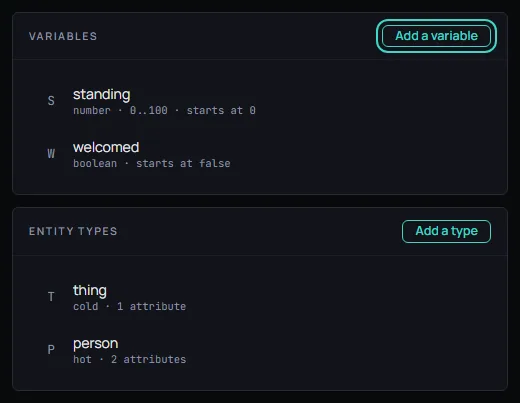
The list on the left has two groups. Variables has an Add a variable button, and Entity types has an Add a type button. The Find box above them narrows both groups by a name, or by what it holds. Until you choose a row, the right side says Nothing is open.
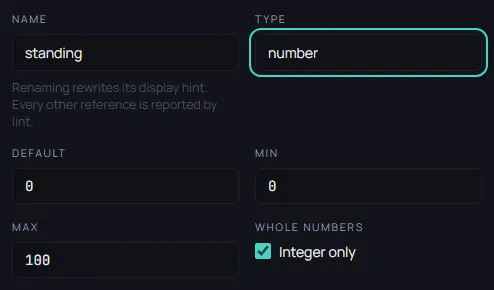
Choose a variable and its form opens:
- Name: What rules and the strip call it. Renaming it leaves every other place that names it as a problem to fix.
- Type: One of number, boolean, string, enum or list.
- Default: What the variable holds when a session starts.
- Min and Max: The lowest and the highest a number can reach. They show for a number.
- Whole numbers: Keeps a number to whole steps.
- Shown as: What a player's screen calls it. Empty means the name above.
- Format: How a screen writes the value. The first choice, as it is, writes it plainly.
- On the strip: Puts the variable on the always-visible row above the story.
- Grouped with: Variables that carry the same word are shown together.
- Hidden: Keeps the variable off the player's screen entirely. It is still real.
Choose an entity type and its form opens:
- Type: The kind's name, such as
person. - Shown as: What a player's screen calls the kind.
- Hot: A hot kind is described to the narrator in full. The switch reads hot or cold.
- Description: What the kind is for, in your own words.
- Attributes: What each one of that kind carries. Add an attribute makes a new one, and each attribute has a form like a variable's.
Below the two groups are Inherited variables and Inherited entity types. They are read only. A ruleset the world pins declares them, so your world has them without saying so.
In Saltmere
The Fantasy template gives Saltmere two variables and two types.
- standing: a number, from 0 to 100, in whole steps. It starts at 0.
- welcomed: a flag. It starts off.
- person: a hot kind with two attributes,
moodandtrust. The mood is one ofwary,civilorwarm, and starts aswary. The trust is a number from 0 to 100. - thing: a cold kind with one attribute,
worth.
Open standing and read its form: the Type is number, the Default is 0, Min is 0, Max is 100 and Whole numbers is on. The Rules section shows the rest of the story. The rule word_gets_around adds 1 to standing each turn, and the_village_opens sets welcomed once standing reaches 5.
Saltmere also has mana and the spell type. It never declares them. The ruleset it pins does, and they appear under Inherited variables and Inherited entity types.
When to open it
Open Schema when a rule needs a number that the template lacks, or when your world has a kind of person or thing the template does not name. Three traps are worth knowing.
- Changing a variable's Type replaces its whole form with the defaults of the new type, so its Min, Max and values are lost. Choose the type before you fill the rest in.
- Renaming a variable leaves every rule that reads it as a problem in Problems. The form says it plainly:
Renaming rewrites its display hint. Every other reference is reported by lint.Fix each rule after you rename. - Declaring a name that a pinned ruleset also declares, but differently, is an error in Problems, and Publish stays off until you rename or remove yours. Declaring exactly the same thing is not a conflict.
Most worlds never need to change Schema, and a first world can be finished without opening it.