
The Rules section
The Rules section holds what your world does on its own. A rule watches for a moment in the story, checks a condition, and changes the world when the condition holds. Many worlds keep the rules the template gives them.
What it is for
A rule changes the world when something happens: a counter goes up as time passes, a door opens when a number is high enough, a person warms to the player. The narrator does not have to decide any of this. The engine applies the rule, and the narrator tells what happened.
Rules fire in the order they are listed, and each rule sees what the rules above it already did. Moving a rule changes what it can read, so the order is part of your world.
What is in it
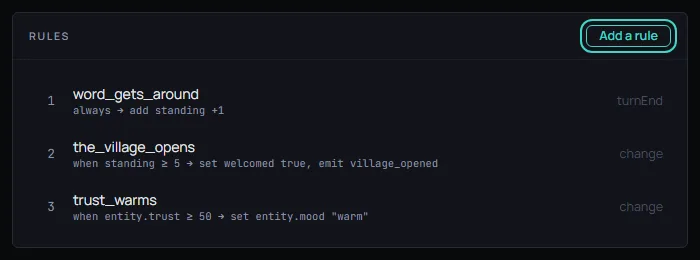
The list at the top shows every rule in firing order. Each row has a number, the rule's name, a short line about what it does, and its trigger. Add a rule makes a new rule that runs as the turn closes and does nothing yet, and opens it. Choose a rule to open it. Until you do, the section says No rule is open.
An open rule has a row of buttons above it: Move earlier and Move later change its place in the firing order, Duplicate makes a copy right below it, and Delete removes it after a question.
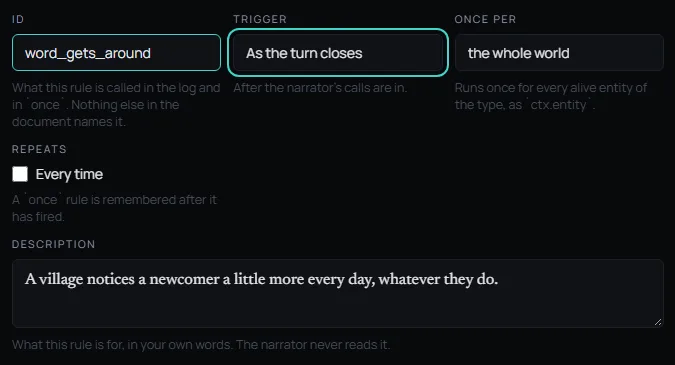
Under the buttons are the rule's fields:
- Trigger: When the rule is checked. On the player's action checks it once per turn, as the turn opens. On entering a place checks it after the player has moved. As the turn closes checks it after the narrator's calls are in. When a slot changes checks it once for every variable written this turn. On an event checks it once for every matching event sent this turn.
- Listens for: Only shown when the trigger is On an event. It names the event the rule waits for. An event is a named thing that some rule or scene sends.
- Once per: Pick the whole world to check the rule once, or pick a kind of person or thing to check it once for each of them.
- Repeats: Every time, or Only once. A rule set to Only once is remembered after it has fired.
- Description: What the rule is for, in your own words. The narrator never reads it.
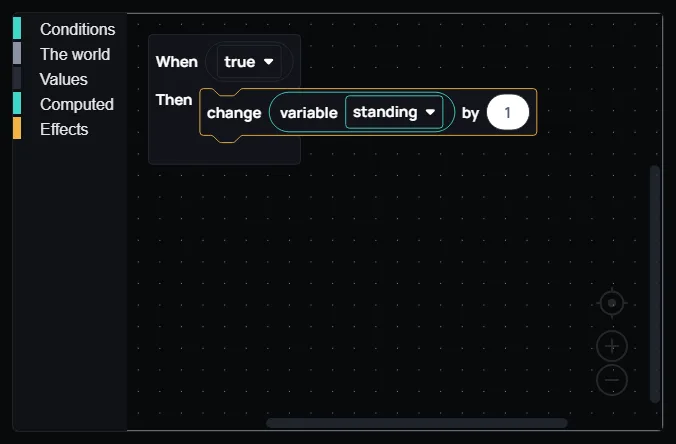
Below the fields are the blocks. They say what the rule does: the When block holds the condition, and the Then blocks hold the changes. Drag blocks in from the lists on the left of the workspace, or change the ones that are there.
Under the blocks, a preview shows the same rule as the document holds it. You do not have to read it, but it tells you exactly what a block did.
In Saltmere
Saltmere keeps the three rules of the Fantasy template.
- word_gets_around: As the turn closes, every turn, it adds 1 to the standing variable. The description reads "A village notices a newcomer a little more every day, whatever they do." Its condition is the block When true, so it always applies.
- the_village_opens: When a slot changes, and once only, when standing reaches 5 or more. It sets welcomed to true and sends the event village_opened. The description reads "Past a point, they stop watching you and start talking to you."
- trust_warms: When a slot changes, for each person, when that person's trust is 50 or more. It sets their mood to warm. The description reads "Trust enough, and the distance goes out of how somebody talks to you."
The rules work together. word_gets_around raises standing, and the_village_opens waits for standing to reach 5. The village_opened event it sends is the one that moves the village scene machine on, as The Scenes section explains.
When to change it
Keep the template's rules for your first world. Add a rule when the world should react to something on its own, such as a clock that runs out or a person who changes how they speak. Give it a name a person would use, pick its trigger, and build what it does with blocks. Test-play your world to see the rule at work.