
Add your character to a world
A character you made, or imported, can join a world you are building. This guide copies Wren Hollis into Saltmere, so the lighthouse keeper stands in the world the player walks through.
Before you start
You need two things:
- A character in your library. Make a character or Import a character card first. Wren Hollis is the one used here.
- A world draft. Make a world from a template makes Saltmere, and the new place in it, The Saltmere light, comes from The Locations section.
Add a copy
Open your world in Studio and press Characters and things in the list on the left. The people and things are grouped by type. Wren is a person, so she goes in the person group, which has a button called Add from my characters. Things, such as the reeve's tally, have no such button, because only people can be copied in.
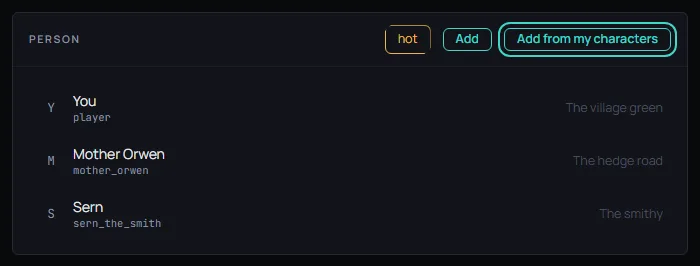
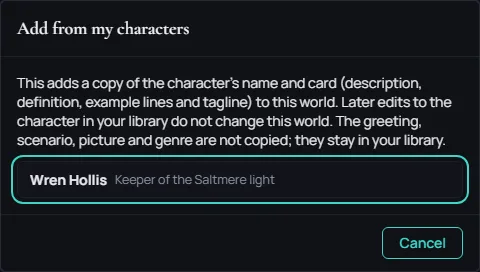
Press Add from my characters. A dialog with that name lists the characters in your library. Pick Wren Hollis.
The dialog closes and Wren's form opens in the world, ready to edit. She is now in the cast, and the Problems list shows no error.
What is copied
The dialog says what a copy carries: "This adds a copy of the character's name and card (description, definition, example lines and tagline) to this world. Later edits to the character in your library do not change this world. The greeting, scenario, picture and genre are not copied; they stay in your library."
A copy is never a link. If you change Wren in your library later, the Wren in Saltmere stays as she was, and if you change her in Saltmere, your library keeps the first Wren. The greeting you wrote does not come with her, because a world has its own opening. The picture and the genre stay behind too.
Where she stands
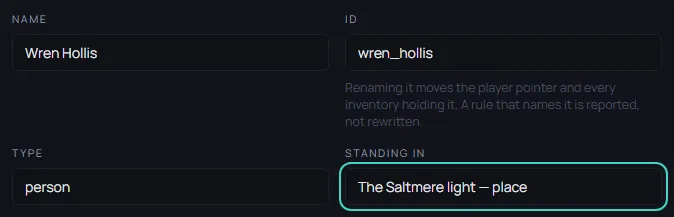
A copy starts in the first place on the world's list. In the form, Standing in says where she is. Pick another place from the list to move her. Here Wren moves to The Saltmere light, the lighthouse she keeps. The Characters and things section explains every other field in her form.
Who cannot be copied
A held character, or one rated above the world, cannot be copied. Its row in the dialog is greyed out, and a line under it says why. For a held character the row reads "Held by the content check; it cannot be copied into a world."
When it is ready
When the world reads the way you want, publish it for review.